WWW.
Time Clock

Clean clock-in/out with rules,
notes, and admin reporting.

This is a working example of a time tracking system we build for teams who need a simple front-end for staff, and a powerful back-end for managers: accurate punches, fewer “who was here?” moments, and reporting that’s actually usable.

Built around your work rules, not a generic punch clock.

We build time clock systems around your scheduling reality: multiple roles, notes, location rules if you want them, late thresholds, pay periods, exports, and admin views that help you run the business, not just collect timestamps.
Screenshots: click image to enlarge, or use dots/arrows (← →)
1 / 7
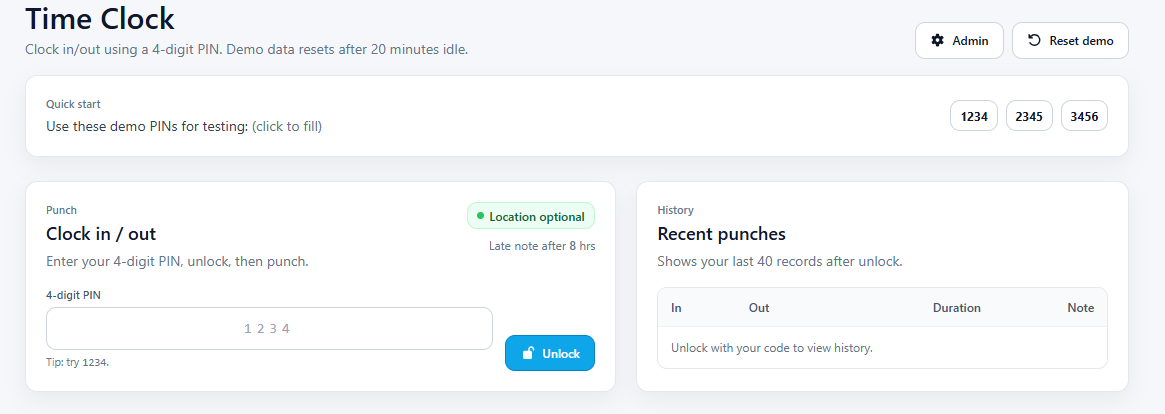
Clock-in/clock-out front page (simple, fast, low confusion)
Clock-in/out • Simple UI
Screenshot 1

Staff front-end (fast + idiot-proof)

A clean clock page that’s quick on mobile and easy for anyone to use. The goal is fewer mistakes, fewer “I forgot” situations, and a flow that doesn’t slow the team down.
Perfect for: small teams who want speed and accuracy.
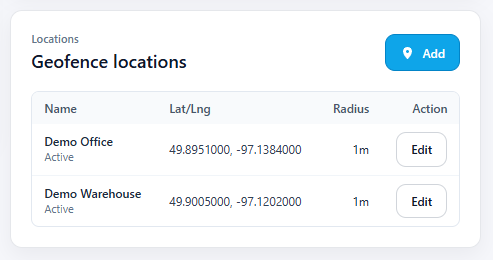
Clock-in/out with optional location capture and rules
Rules • Optional location
Screenshot 2

Optional location rules (when you actually need it)

If you want it, clock-in/out can require location (or only require it for clock-in, or only for clock-out). If you don’t, keep it frictionless. The system adapts to your policy.
Perfect for: field work, multiple sites, or compliance-heavy teams.
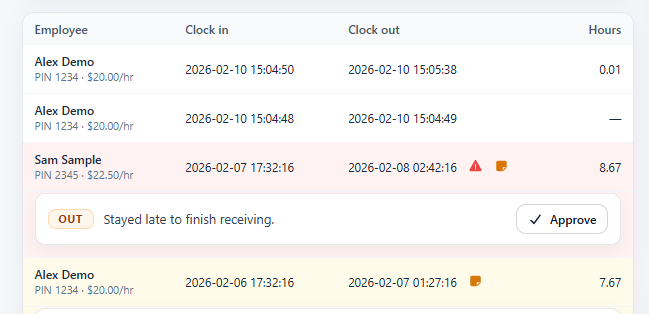
Add notes to punches and show compact history
Notes • Clear history
Screenshot 3

Notes that explain the “why”

Notes on punches keep your records useful: shift coverage, appointment runs long, moved locations, left early for a reason. It’s the difference between raw logs and actual context.
Perfect for: preventing follow-up calls and payroll guesswork.
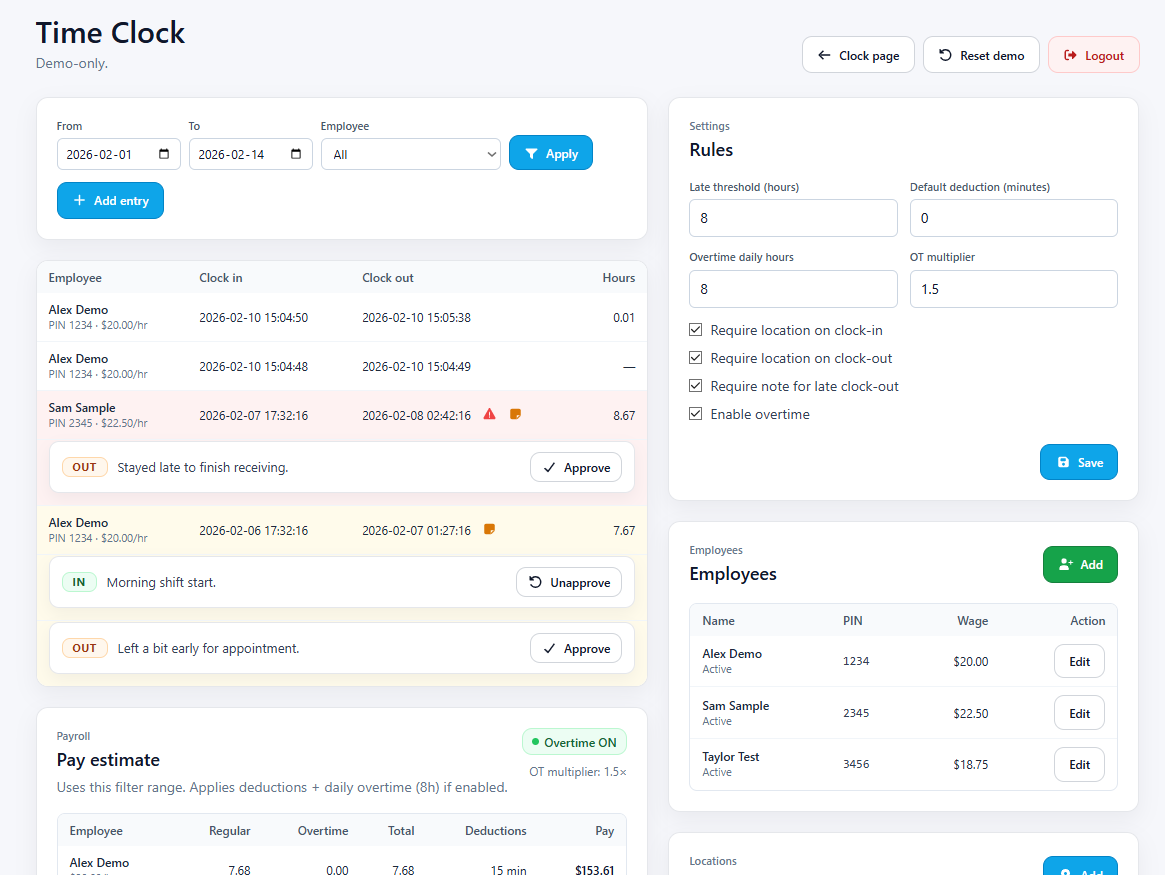
Admin dashboard for punches with filters and quick corrections
Admin • Manage punches
Screenshot 4

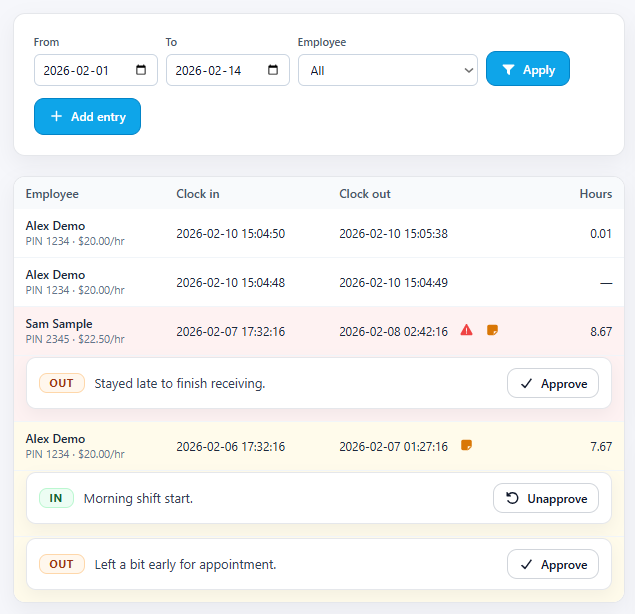
Admin control (no 14-tab chaos)

Review punches, filter by staff/date, and handle fixes when needed. Managers can keep records clean without turning payroll into a weekly detective story.
Perfect for: day-to-day operations and quick corrections.
Pay period view with totals and clear time breakdown
Pay periods • Totals
Screenshot 5

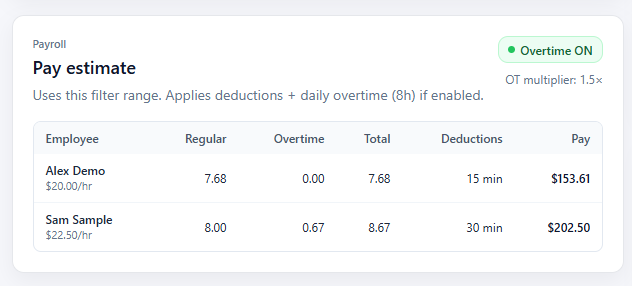
Pay-period reporting that’s readable

See totals, breakdowns, and exactly what happened in the period, without spreadsheets that look like they were built in 2007. Works for weekly or biweekly setups.
Perfect for: payroll prep and reducing “is this right?” questions.
Settings for late threshold, rules, and behavior toggles
Settings • Policies
Screenshot 6

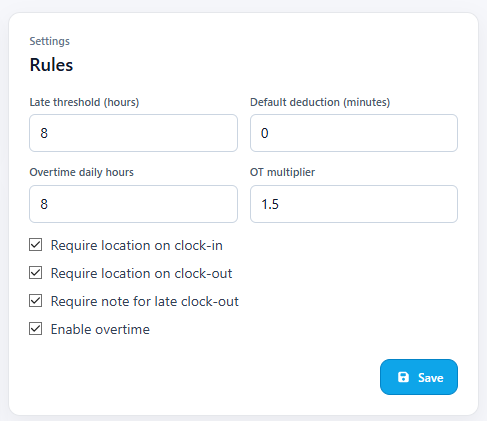
Rules & thresholds (configured to your policy)

Late thresholds, required fields, behavior toggles, and the guardrails your business actually wants. You decide how strict or flexible the system should be.
Perfect for: consistency across shifts and managers.
Exports and audit-friendly history for payroll and records
Exports • Audit trail
Screenshot 7

Export-friendly + audit-minded

When it’s time to hand off to payroll or accounting, you want clean data. Export formats, consistent records, and an audit trail that makes sense.

Perfect for: payroll handoff and keeping records defensible.

What this time clock can do

Fast UI • Smart rules • Admin-ready
Clock-in / clock-outSimple staff flow with clear confirmations and clean history.
Optional location rulesRequire location for in/out (or neither) depending on your policy.
Notes on punchesCapture context like “covered shift” or “left early,” without mess.
Late thresholdsFlag late arrivals based on your settings and pay-period rules.
Admin dashboardReview punches, filter by staff/date, and keep records consistent.
Pay period summariesWeekly/biweekly reporting with totals that are easy to verify.
Export-friendlyClean outputs for payroll/accounting workflows and handoffs.
Role-based structureSupport multiple employees and growth without redesigning later.
Audit-minded loggingConsistent history that helps resolve disputes without drama.
Mobile-firstDesigned for phones and tablets where staff actually clock in.
Policy togglesMake it strict or flexible: you choose what’s required.
Built to evolveAdd scheduling, approvals, overtime rules, kiosks, or portals later.

Not just time tracking

If you can describe it, we can build it.
ApprovalsManager approvals for edits, missed punches, and exceptions.
DashboardsAttendance summaries, alerts, and weekly operational views.
SchedulingShift schedules that connect directly to attendance records.
PortalsStaff portals for documents, messages, and workflows.
Inventory systemsStock control, orders, scanning, and safety tracking.
Anything customWe build to your workflow, not the other way around.
Want this built for your team, with your rules?
Tell us how you track time today, what your policy needs, and what payroll needs to export, and we’ll shape it around you.
View demo ↗ Contact Winnipeg Wide Web